To reduce ecommerce friction, identify where visitors struggle to make progress, investigate what is causing that struggle, and prioritize changes using customer evidence and business impact.
That sounds straightforward. Until someone decides the answer is a redesign, another pop-up, or fewer clicks.
Any of those changes might help. But first, you need to know what is getting in the visitor’s way.
What is ecommerce friction?
Ecommerce friction is unnecessary effort, confusion, or uncertainty that makes it harder for a visitor to find, evaluate, or buy a product.
Some friction is obvious: a broken filter, an unclear error message, or a checkout that won’t accept a valid address.
Other friction comes from the decisions your site asks people to make. A visitor may struggle to understand the differences between products, find the right size, compare options, or work out which promotion applies.
A page can function perfectly and still be difficult to shop.
Reducing friction means helping visitors make progress. Sometimes that requires removing a step. Sometimes it requires adding a useful question, comparison, or explanation.
How to identify friction in the customer journey
Start with a specific journey or business concern. For example: visitors reach a category page but rarely explore products, or shoppers add items to their bags but struggle to complete checkout.
Then combine the evidence you already have:
- Analytics: entry pages, journey progression, exits, onsite search, filter usage, and differences by device or traffic source.
- Session recordings: repeated attempts, confusing interactions, backtracking, and the context around abandonment.
- Customer feedback: questions, complaints, research findings, and information visitors say they cannot find.
- Previous experiments: what changed, who responded, and whether the business outcome improved.
One metric rarely explains the problem. A high exit rate tells you where to investigate. It doesn’t tell you what to fix.
Use patterns like these to guide the investigation:
| Observed behavior | Possible source of friction | What to investigate |
|---|---|---|
| Repeated filter changes with little product exploration | Visitors struggle to narrow the assortment | Filter labels, result counts, available attributes, and recordings of the sequence |
| Moving back and forth between similar products | Important differences are difficult to compare | Product information, comparison tools, and questions raised in research |
| PDP exits after choosing an option | Uncertainty about availability, price, fit, or delivery | Option behavior, stock messages, total cost, and customer feedback |
| Promotion clicks without purchase progression | The offer distracts or fails to resolve the visitor’s need | What happens after the click and how behavior differs across visitors |
| Repeated checkout attempts or errors | A technical or form interaction problem | Error logs, validation messages, device differences, and affected recordings |
These are hypotheses. Visitors comparing several products may be doing exactly what they intended. The question is whether the experience supports that decision or makes it unnecessarily difficult.
How to reduce ecommerce friction where decisions break down
Help visitors narrow the assortment
When visitors struggle with product discovery, investigate whether your categories, search results, and filters reflect how they actually choose.
A useful filter can remove uncertainty. An irrelevant one can add work. Hiding filters by default can also make discovery harder if visitors need them.
The right change depends on what people are trying to find and which information helps them narrow their options.
Make product differences easier to understand
On a product detail page, ask what the visitor still needs to decide.
Can they understand the options? Compare meaningful differences? Find delivery information? Resolve questions about fit or suitability?
Keep decision-critical information accessible. Use expandable details where they make the page easier to navigate, but don’t hide information people need just to make the design look cleaner.
Give promotions a useful role
A promotion may help someone decide. It may also compete with product discovery or interrupt a visitor who is already moving toward purchase.
In my promo drawer case study, moving always-visible promotions into an on-demand drawer reduced promotion clicks while improving broader ecommerce results. The deal-seeking audience responded differently, highlighting a reason to investigate a more targeted treatment.
That result supported changing how offers were presented. It didn’t establish a universal rule to hide promotions.
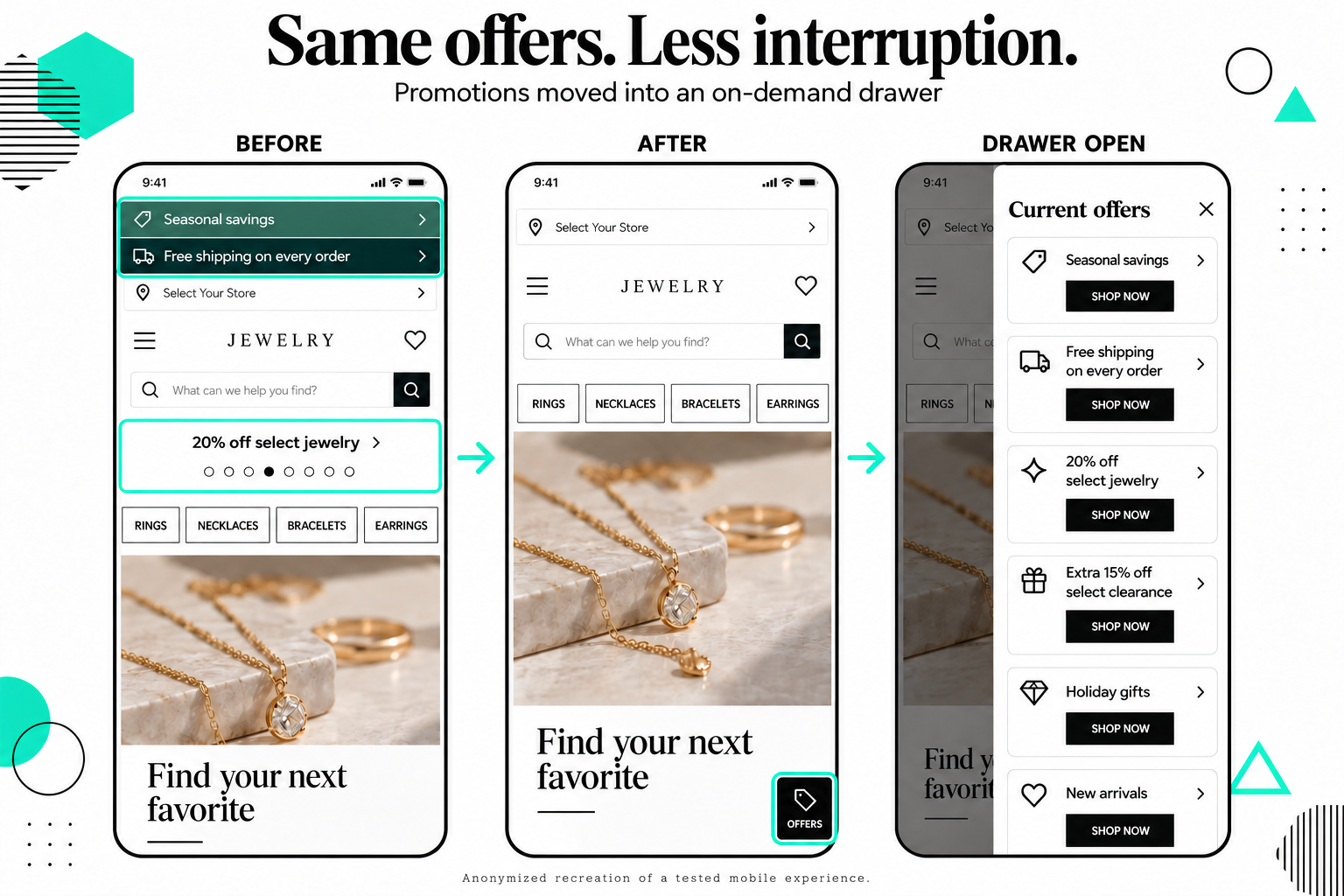
Promotions moved from banners and a carousel into an on-demand drawer, keeping offers available while giving product content more room. Anonymized recreation.
Remove unnecessary steps, preserve useful ones
A question that narrows the assortment can save someone from scrolling through products that don’t fit. An extra confirmation that repeats information they already supplied creates work without helping.
Evaluate what the step accomplishes. Counting clicks alone won’t tell you whether the journey is easier.
I explore that distinction further in why fewer clicks don’t always mean less ecommerce friction.
How to prioritize what to fix first
A useful friction review should produce a short list of decisions your team can act on.
For each opportunity, assess:
- Customer impact: What task or decision is becoming harder?
- Reach: How many relevant visitors encounter the problem?
- Business impact: What outcome could improve if the problem is resolved?
- Evidence strength: Do analytics, feedback, and observed behavior point in the same direction?
- Effort and dependencies: What would it take to investigate or change the experience?
Then choose the next action.
A broken interaction needs a fix. An uncertain design choice may need an experiment. An unclear customer problem may need more research. Different visitor needs may justify personalization.
Choose the action that fits the evidence.
Measure whether the change helped
Connect measurement to the problem you intended to solve.
For a discovery change, product exploration and narrowing behavior can help explain the response. For a PDP change, option selection, add-to-cart behavior, and customer questions may be useful diagnostics.
Use downstream business outcomes to assess value. Where feasible, compare against a control and examine revenue per visitor alongside conversion rate and average order value.
More interaction can mean the experience helped. It can also mean visitors had to work harder. Fewer clicks can mean lost interest or a clearer path.
Interpret the measures together. My guide to revenue per visitor versus conversion rate explains why a conversion increase can still hide a revenue tradeoff.
Need a clearer answer on what to improve next?
If your team has analytics, customer feedback, research, or previous test results but no clear priorities, my Ecommerce Growth Opportunity Sprint brings that evidence together.
You receive 5–10 prioritized opportunities and a strategy readout explaining the customer problem, the evidence, and the recommended next action.
The fixed investment is $4,500, with a typical turnaround of 7–10 business days once access and materials are available.